
If a website asks you to press Windows + R, paste something, and hit Enter to prove you’re human — stop. That isn’t a CAPTCHA. It’s a social-engineering technique security researchers call ClickFix.
Legitimate human-verification tools (Google reCAPTCHA, Cloudflare Turnstile, and similar) never ask you to open the Windows Run dialog, PowerShell, or Terminal. When a page does, treat it as an attack and close the tab.
What ClickFix is
ClickFix isn’t one piece of malware. It’s a delivery trick. Attackers show a familiar-looking prompt — often “Verify you are human,” a Cloudflare-style check, a fake browser error, or a “How to fix” message — then coach the victim to “complete verification” by pasting into a trusted Windows dialog.
Typical flow:
- You land on a page via phishing email, a shady ad redirect, a compromised site, or an HTML attachment.
- 2. You see a fake CAPTCHA or “fix” screen.
- 3. Clicking the checkbox or “How to fix” button quietly copies a command to your clipboard.
- 4. On-screen steps tell you: Win+R → Ctrl+V → Enter.
- 5. You press Enter — and the command runs under your account.
Because you ran it, the attack can slip past defenses that only watch for malicious file downloads or email attachments.
Microsoft, Proofpoint, ReliaQuest, SentinelOne, Huntress, and CISA/FBI have all documented this same pattern.
What it looks like to the end user
Here’s the victim view — screenshots from public security research (credited under each figure). Use these in staff training so people recognize the layout before they hit Enter.
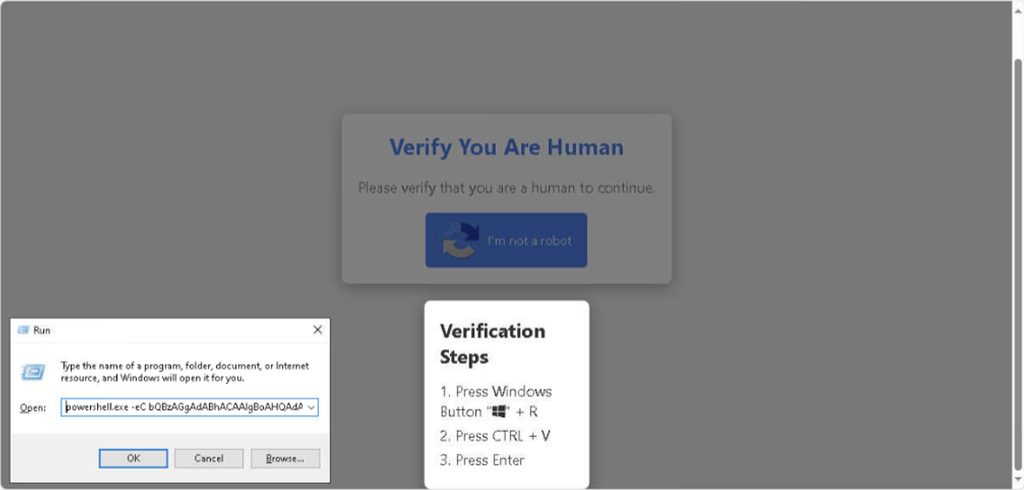
Figure 1 — Fake “Verify You Are Human” with Win+R steps and Run dialog. Credit: ReliaQuest, “Using CAPTCHA for Compromise.”
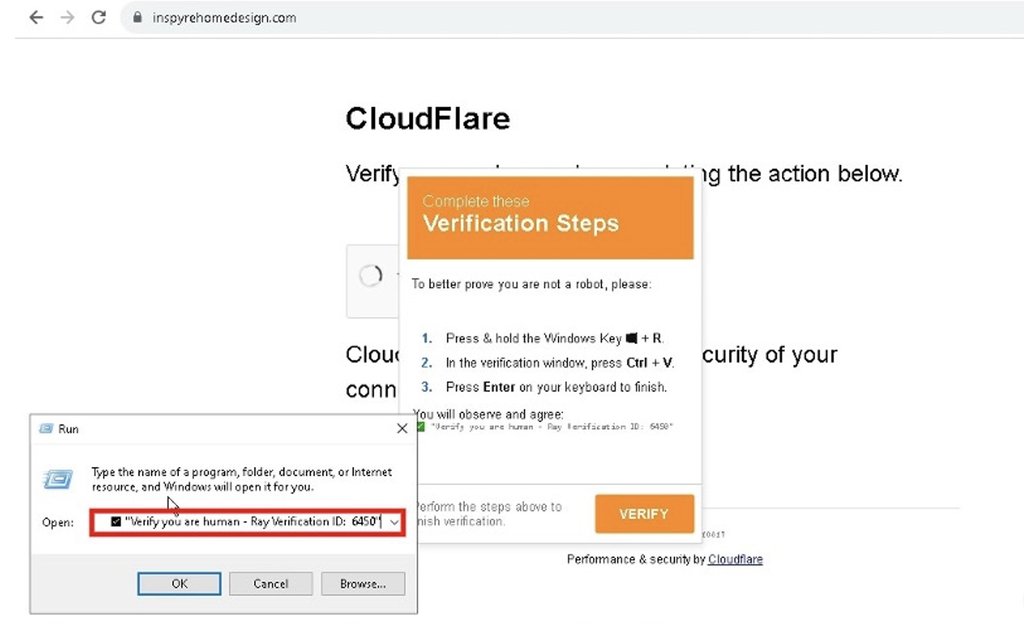
Figure 2 Fake Cloudflare-style page; a benign-looking “Ray Verification ID” can mask the real command. Credit: ReliaQuest.
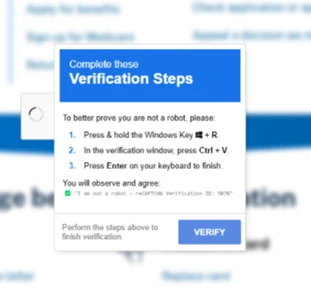
Figure 3 — “Complete these Verification Steps” (Win+R / Ctrl+V / Enter). Credit: Microsoft Threat Intelligence, “Think before you Click(Fix).”
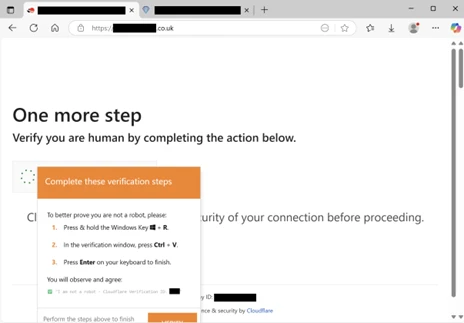
Figure 4 “One more step / Verify you are human” Cloudflare-style spoof. Credit: Microsoft Threat Intelligence.
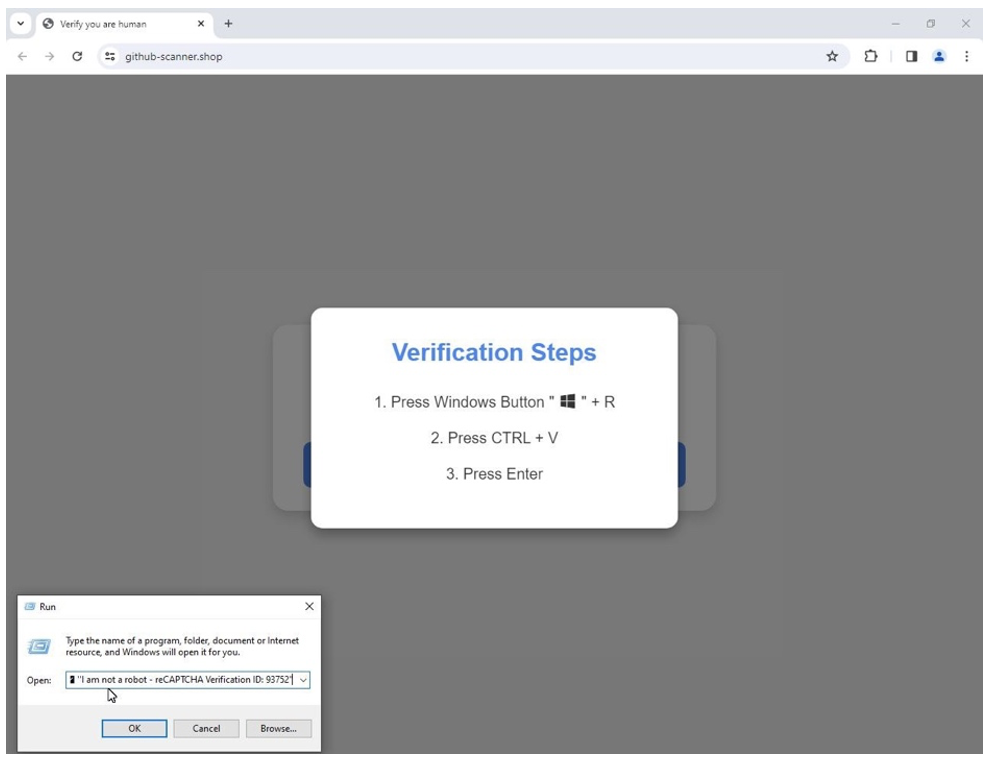
Figure 5 — Fake verification page with Run dialog paste. Credit: Proofpoint, ClickFix security brief.
What the threat does after you press Enter
Once the pasted command runs, ClickFix is just the front door. Vendor research has tied it to:
• Infostealers (for example Lumma Stealer) that grab browser passwords, cookies, and session tokens
• Remote access tools / RATs (for example NetSupport RAT, AsyncRAT, Xworm)
• Loaders and follow-on malware — CISA/FBI have also noted ClickFix use by Interlock ransomware actors among other campaigns
Microsoft has described ClickFix campaigns as growing in popularity, with activity observed against enterprise and end-user devices globally (Windows and macOS). Proofpoint reported multi-actor use and, in one GitHub-themed campaign visible to them, impact on at least 300 organizations. Huntress has reported a sharp rise in ClickFix-related incidents in its customer base (see their write-up for the exact figure and timeframe).
The business impact is familiar: credential theft, account takeover, remote control of a workstation, and a foothold for whatever comes next.
Why “don’t open attachments” training isn’t enough
Many people already know not to open a random executable from email. ClickFix reframes the payload as a paste into Run under a fake CAPTCHA. Training needs this specific picture.
What to do (users)
- Never open Run, PowerShell, or Terminal to finish a website CAPTCHA or “fix” a page error.
- 2. Treat Win+R → Ctrl+V → Enter on a webpage as a red alert: close the tab and tell IT.
- 3. Be suspicious of unexpected “Verify you are human” walls after odd redirects or ads.
- 4. Report fake errors to IT instead of trying to fix them yourself.
What to do (organizations)
- Train with real ClickFix screenshots (the figures above).
- 2. Strengthen email and web filtering; treat HTML attachments carefully.
- 3. Use endpoint detection that watches for browser/explorer launching PowerShell after a paste-and-run.
- 4. Harden where appropriate: script logging, managed browsers, MFA on Microsoft 365 and other critical accounts.
- 5. If ClickFix may have succeeded: isolate the device and reset credentials/sessions.
Bottom line for Mid-Michigan teams
Real CAPTCHAs never need Win+R. If you’re unsure, stop and call your IT partner.
KW’s Managed IT team can help with awareness materials, Microsoft 365 hardening, and endpoint monitoring for this class of attack. Contact us at https://kw-corp.com/contact-us/ or call 517-223-3610.
Technology @ Your Service
KW Corporation · 307 W. Grand River Ave, Fowlerville, MI 48836
Image credits / sources
Screenshots courtesy of ReliaQuest, Microsoft Threat Intelligence, Proofpoint, and SentinelOne research publications; used for educational commentary. See original articles for full analysis:
ReliaQuest: https://reliaquest.com/blog/using-captcha-for-compromise/
• Microsoft: https://www.microsoft.com/en-us/security/blog/2025/08/21/think-before-you-clickfix-analyzing-the-clickfix-social-engineering-technique/
• Proofpoint: https://www.proofpoint.com/us/blog/threat-insight/security-brief-clickfix-social-engineering-technique-floods-threat-landscape/
• SentinelOne: https://www.sentinelone.com/blog/how-clickfix-is-weaponizing-verification-fatigue-to-deliver-rats-infostealers/
• Huntress: https://www.huntress.com/blog/dont-sweat-clickfix-techniques
CISA/FBI AA25-203A: https://www.cisa.gov/news-events/cybersecurity-advisories/aa25-203a